![Wing_Blue.svg]](https://flexhelp.con-linq.com/hubfs/Wing_Blue.svg)
When you experience the need to differentiate the customer set up with regards to for example booking properties, mandatory data entry, possible unit type selections or many others, navigate to the page Booking options.
The page is found via the Customers Section, where you will need to open and edit  the customer to be able to find the booking options.
Once opened, please use our field descriptions below if you have any doubt.
Default ready future days for booking 
Controls how many days should be added automatically to the “Ready date” on the

Mandatory booking address emails
Controls if its mandatory to enter an email address for the Shipper.
Pre-booking status setting
Enable this if the customer should have access to pre-book a booking. Only available for Air.
Requested Departure field
When this field is ticket the field “Requested Departure” will be made visible for the user. Its also possible to make the field mandatory.
Booking properties
Under booking properties its possible to modify which booking properties should be visible for the customer. Its possible to create new properties or deactivate existing ones. Each property can be set up based on the following parameters:
- Manual handling. Does the booking require manual handling before confirmation?
- Require commercial value. Is the value of the goods required for customs clearance or other purposes?
- On line level. Should it be possible to define the property per line instead of the booking as a whole?
- Should the booking property appear as default?
- If the property is required for all bookings.
- Show on shipment note. If the property should be displayed on the shipment note.

Default contacts in booking
If this setup is unticked its possible to setup a special contact person related to a specific customer department.
Special booking emails
Enter emails here if the booking notification should overrule the general booking notification setup under Settings -> Users -> Offices
Booking cargo insurance setting
Controls whether the customer should be offered the possibility to select cargo insurance under Booking Details.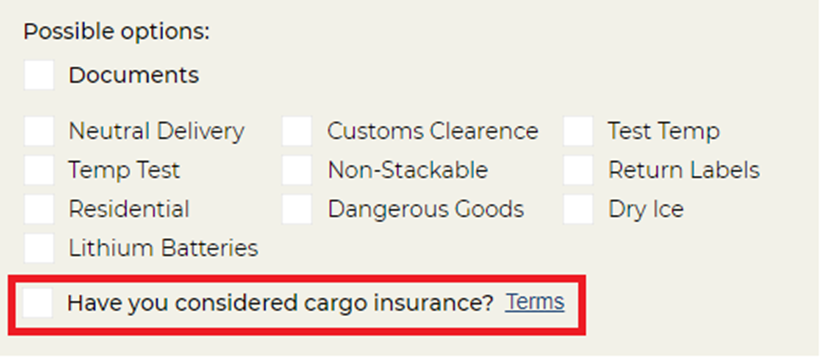
Booking description, comments, reference settings
Decides whether cargo description, reference, sender reference, receiver reference and comments to the operator should be shown. It also controls if its mandatory for the user to enter a booking reference.
Booking attention level
Change the number here, if you want the bookings to be marked with a different attention level. Default and lowest is 1
Show default services
When ticked its possible to add a number of services you offer your customers, which will then be possible to select from when booking.
On line level booking settings
In this section it is possible to define the booking setup per line. Line setup can be done based on the parameters listed below;
- Validate dimensions on line level: Tick this if you want to force the user to enter dimensions for each booking line
- Enable CBM manual on line level: If should be possible for the customer to manually insert the CBM per line.
- Enable LDM on line level: Possibility to enter LDM on line level.
- Is LDM mandatory: Defines whether it should be mandatory to insert LDM to complete the booking.

Units and Commodity settings
Possibility to add or delete unit types to be used on the booking line details.

Booking line reference field
Enables the option to enter a reference on line level. And also, if activated, should it be mandatory to enter a reference per line.

Booking line description field
Enables the option to enter a description on line level. And also, if activated, should it be mandatory to enter a description per line.

Show CMR
Controls whether it should be possible to view the CMR note.

Shipment note
If a customer specific shipment note has been designed, it can be selected her. Otherwise the default shipment note will be used for all bookings.
